Search engines and AI assistants "parse" images. Google's AI Mode and the multimodal models behind ChatGPT, Perplexity, and AI Overviews detect the objects in a photo, run OCR on any text inside it, infer attributes like color, material, and style, and fire off a fan of background queries to confirm what they're looking at. That fan isn't one query, it's dozens. A single product photo can explode into "jeans that make legs look longer," "comfortable jeans for all day sitting," and "minimal stitching clean look denim," all from the pixels. The answers the engines hand back are influenced by visual data and include images. Image GEO is how you make sure your visual data reinforces your message. It's image SEO, alt text, schema, page speed, plus one new job: your images have to survive being read as a concept, not just served as a file.
A legible image is one a machine can decode without guessing: a clear subject in an uncluttered frame, any on-image text in high-contrast OCR-readable type, described in the copy next to it and in its alt text, so that what the model sees, reads, and is told all agree. AI rewards legible images because it can retrieve, understand, and cite them with confidence.
Everything here is checked against primary sources (Google's rater guidelines, Search Central, web.dev, Microsoft/Bing) and current research. Sources at the end.
Best practices for AI-friendly images
Start with what the machine can actually read
1. Make every image machine-legible.
Clear subject, uncluttered frame, and any real text set as a high-contrast overlay instead of baked into a busy background. Give them something clean to read.
Test what the machine actually reads (2 minutes).
Open Google's Cloud Vision "Try it" demo and drag your image in. No login.
Read three tabs: Labels (what objects and concepts it detected, with confidence), Text (OCR — does it catch your overlay text?), and Properties (the dominant colors it sees).
Look for the gap: if your "french navy" bag comes back as blue, bag, leather and the OCR misses your text, the machine isn't reading what you think it is.
Now upload the same image to ChatGPT or Claude and ask: "Describe this image as literally as possible — object, color, material, any text, and what it's for."
Where Vision, the LLM, and your product page disagree is your fix list.
Don't stop at the objects. Check what the scene implies, because the fan-out does. A desk with a laptop, a mug, and a plant doesn't read as three items — it reads as a "work from home setup." A coffee maker with a thermal carafe and a row of buttons reads as an "office coffee maker." If the machine can infer the use case and you never wrote it down, that's a query you're invisible for (Metehan Yesilyurt's visual fan-out testing).
2. Write alt text as a full sentence of fact, not a pile of keywords.
✅ "Navy leather weekender bag with a laptop sleeve, standing upright" does the job.
❌ "bag travel leather SEO" does not.
Google says outright it uses alt text "along with computer vision algorithms and the contents of the page" to understand an image, and tells you to avoid stuffing it with keywords. For multimodal search, alt text is "grounding" that resolves ambiguous visual tokens, and for AI agents it's the image's name in the accessibility tree — literally how an agent finds and clicks it. Researchers even augment the accessibility tree with image captions before feeding it to agents, because the tree alone under-describes pictures. One field, three jobs beyond accessibility for humans.
3. Name your files like a human describing the photo.
navy-leather-weekender.jpg beats IMG_4821.jpg. Google's words: the filename gives it "very light clues about the subject matter." Light clues are still clues.
Prompt to pressure-test your filenames (upload the photo — the model has to see it): "Here's a product photo. Suggest 3 SEO filenames as if a human were describing it to someone who can't see it. Rules: lowercase, hyphen-separated, no stop-words, no 'image' or 'photo', under 6 words, most distinctive attribute first (color, material, model, then object). Output the filenames, then one line on which visual detail drove your top pick." Then check the winner against the Vision demo's Labels tab. When your filename, your pixels, and the machine all say "navy / leather / bag," you're aligned.
4. Say in words what the picture shows, right next to it.
The color gap: you write "blue," the customer searches "french navy," the model sees a mid-dark blue. Name the specific shade in copy and alt text. After analyzing hundreds of e-commerce sites, Metehan Yesilyurt found this "color blindness" everywhere: sites writing "blue" while the image clearly shows "dusty slate blue" or "french navy," the exact conversational shade buyers type.
The naming gap: your page says "Dr. Martens 1460 8-eye boot," but a huge share of demand searches "Doc Martens," a name the brand barely uses on-page. The picture shows a black 8-eyelet leather boot; your copy should say "black 8-eyelet leather boot (commonly called Doc Martens)." Google's own line: place images "near relevant text."
The feature gap: the image shows "reinforced stitching," "hidden pockets," or "adjustable straps", specific details people search for, and your description never mentions them. Same for style: an image that clearly reads "minimalist," "industrial," or "cottagecore" while none of those words appear in the text. If the visual analysis sees the attribute and your copy doesn't say it, you don't surface for it. The fix is simple and repeatable: run your images through a vision model, list the attributes and use-cases it names, and feed the gaps back into your descriptions, alt text, and supporting content (FAQs, buying guides).
Earn the trust (this is the E-E-A-T part)
5. Use your own photography for anything you actually sell
…and know that originality is measurable. Original, first-hand images are how you show the "Experience" in E-E-A-T, and Google can quantify it. Cloud Vision's WebDetection returns fullMatchingImages (exact copies across the web) and pagesWithMatchingImages; if your URL holds the earliest index date for a unique product angle, Google credits your page as the origin and your "experience" score rises. Run your hero through the Vision demo Web tab: one match means original; a crowd means interchangeable. Stock and AI are fine for decoration. For the product itself, shoot it.
6. You can absolutely use AI to improve product images
Merchant Center's Product Studio does background removal, scene generation, and upscaling. Keep the product accurate, don't strip metadata, and label the edit with IPTC DigitalSourceType — TrainedAlgorithmicMedia for a fully AI-generated image, CompositeSynthetic for a real product photo with an AI background or elements (Merchant Center: AI-generated content). For example, a real bag composited onto an AI beach is CompositeSynthetic. Product Studio writes that tag automatically for you.
Don't let images wreck your Core Web Vitals
7. Protect the hero image, because the AI layer is less forgiving than a browser.
AI crawlers (GPTBot, OAI-SearchBot, ClaudeBot, PerplexityBot, Meta's and ByteDance's bots) don't render JavaScript; they take the raw HTML and stop. They also impose tight timeouts, often 1–5 seconds, because rendering at their scale is too expensive. A slow hero means a crawler can leave before it loads. And in RAG, pages are parsed into passages, embedded, and retrieved on demand: if JavaScript hides your decisive image, this is not good.
Convert, because traffic isn't the point
8. Pick images that earn the action, not just the click.
The brain reads an image in about 13 milliseconds, and most of what reaches it is visual, so the picture often decides before anyone reads a word. Use real, contextual, sometimes user-generated images. On a product page, show angles, close-ups, and a 360 view. Skip the staged stock that screams "we've never actually used this product."
9. Engineer familiarity through what surrounds the product.
AI labels every object in a frame and infers brand, price point, and audience from the neighbors, so adjacency is a signal. This is scene composition, and it's how you engineer "implied use cases." Photograph a blue leather watch next to a brass compass and warm wood grain and you engineer "heritage exploration"; put the same watch next to a neon energy drink and a plastic stopwatch and the narrative changes along with the entity's perceived value (Image SEO for multimodal AI). The catch: the AI reads the narrative your props create so once you've staged the scene, make sure your text names the use case and the vibe it implies. Shoot recognizable, real-world context whose objects tell a story that supports your brand and price point.
10. Match the emotion to the intent (sentiment is read too).
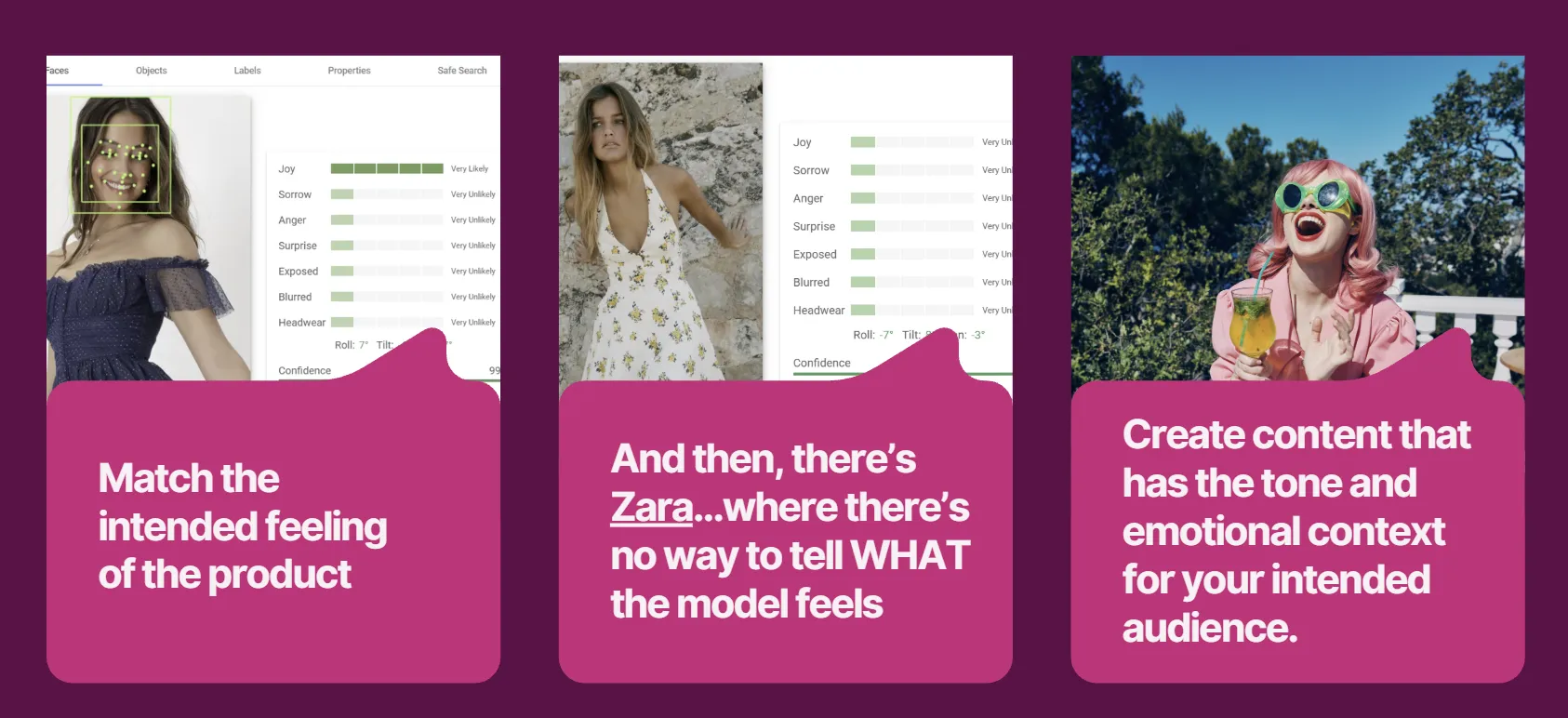
Multimodal models score facial emotion; Cloud Vision returns joy, sorrow, anger, and surprise likelihoods. That creates an emotional-alignment vector: if you sell fun summer outfits but your models look moody, the AI may de-prioritize the image because the visual sentiment conflicts with the query. For a "happy family dinner" intent you want joyLikelihood: VERY_LIKELY, and the read is only trustworthy when detectionConfidence is 0.90+, below 0.60 the face is too small, blurry, or side-profile and any emotion score is noise. This is also how "vibe" searches resolve: when someone asks for a "cottagecore" or "professional" look, the model is checking whether the image's sentiment matches the mood they asked for. Spot-check faces in the Vision drag-and-drop demo before a shot becomes your hero.
The new layer: agentic and machine-readable
Everything above optimizes for retrieval and citation — whether an answer engine can find, understand, and surface your image. This section is a different system: agents that act. An autonomous agent (OpenAI's ACP, Google's UCP, anything driving a browser) doesn't just read your page, it tries to do something on it — find the product, click it, add it to cart. That's a much harder job, and the failure modes are different. The VisualWebArena benchmark, which tests exactly this, found the best multimodal agents completed only 16.4% of realistic visual web tasks, with OCR, spatial reasoning, and holding context over multiple steps as the weakest areas. Optimizing for the agent is optimizing against those failure modes.
11. Don't ship animated GIFs, convert them.
A GIF runs 2–5 MB (10–50× a static image) and tanks LCP when it's above the fold. Re-encode to a muted, autoplaying, looping MP4 or WebM (autoplay muted loop playsinline) for an 80–95% size cut, or let an image CDN auto-serve video in place of the GIF. If you show a 360° spin, remember the model samples roughly one frame per second, so hold each key angle long enough to be sampled, and keep a static, OCR-legible shot as the primary.
12. Give every actionable image a unique, accurate name.
An image's alt text is its name in the accessibility tree, and an agent clicks by role and name. A clickable image with no alt is a node the agent can't address. This is how agents actually navigate: researchers feed them the accessibility tree, and when that tree under-describes the page, they fall back to a "Set-of-Marks" representation: a script that draws a bounding box and a unique ID over every interactable element, so the agent can say "click element 14" (VisualWebArena). Either way, your image needs a clear name that matches its visible label. Let decorative images go alt="".
13. Kill duplicate accessibility-tree nodes.
An image with alt text plus an adjacent link repeating the same words gives the agent two identical targets. One name per target. The same problem shows up visually: when interactable elements sit too close together, agents (and the Set-of-Marks boxes drawn over them) start overlapping and misfiring, which is one of the documented reasons they misclick. And please, let's not spam ARIA the way the industry spammed alt text — a button already knows it's a button.
14. Server-render the images that matter.
Images injected by client-side JavaScript show up in the rendered tree but not the raw payload, so an agent that doesn't render sees a blank where your customer sees a product. Many benchmark agents operate on the raw HTML/DOM or the accessibility tree precisely because spinning up a full browser for every step is too expensive, so a JS-dependent hero is a blank wall to them. There's a second failure mode: agents give up early. If the decisive element isn't present on load, they tend to abandon the task rather than wait or explore. In agentic commerce (OpenAI's ACP, Google's UCP), the product image becomes a feed field, and the feed has to match the page or the agent walks. One more reason this pays: a clean accessibility snapshot is roughly 2–5 KB, while the screenshot an agent falls back on is 100 KB or more, semantic, well-named images are a 20-to-50× discount on being used by an agent.
15. More images is not automatically better.
Peer-reviewed research found extra product images can fail to help, and sometimes hurt, how a multimodal model performs. VisualWebArena found the same on the agent side: pages with "denser visual content" — multiple smaller images arranged very closely — are where the accessibility tree stops being able to disentangle elements, and agent performance drops. Lead with your highest-utility shot and stop padding the gallery.
The checklist
Per image:
Descriptive filename (real words, hyphens, no IMG_####)
Unique, factual alt text (subject, action, context; no stuffing, no "image of")
Width and height set (should be a default)
Compressed, right format, served responsive (srcset / sizes)
Sits next to copy that names what it shows (specific color, common product name)
Names the attributes and use-case the image implies (shade, material, visible features, style, "work from home setup") — not just the object
On-image text is high-contrast and OCR-legible (≥30px character height, ~40 grayscale contrast)
Accessible name is unique and matches the visible label; decorative images do not need an ALT
IPTC creator, credit, and copyright kept
Original where it counts: passes the WebDetection "earliest source" test (optional)
AI edits labeled with IPTC DigitalSourceType (TrainedAlgorithmicMedia / CompositeSynthetic), metadata not stripped (use this mainly when optimizing for your e-commerce site)
Faces, if any, read at the intended emotion with detectionConfidence 0.90+
Per page:
Hero image: fetchpriority="high", eager, preloaded, never lazy-loaded, loads in seconds
Below-the-fold images lazy-loaded; nothing above it is
Critical images server-rendered (present in raw HTML, without JS)
ImageObject and/or Product schema where it earns its place (verified in Rich Results Test)
No duplicate accessibility-tree nodes from an image plus repeated link text
Interactable images aren't crammed so close that an agent can't tell them apart
Core claims and key visuals in the first 20% of the page
Original photography for anything you sell
Served via CDN with a real caching strategy
Per asset:
Animated GIFs converted to muted, looping MP4/WebM
Key angles in any spin held long enough to be sampled (~1 fps)
Captions written as standalone facts
Feed images (stores) match the on-page images
FAQ
What is image GEO?
Optimizing your images so AI answer engines and search engines can retrieve, understand, and cite them. It builds on image SEO, then adds machine-readability for the multimodal models that now read images as concepts instead of files.
How is it different from image SEO?
Image GEO adds three machine-reading facts of life: AI runs Visual Search fan-out against everything it detects, it reads text inside your images with OCR, and it treats the picture as a concept your copy has to confirm. Do image SEO well and you're most of the way there, though.
What's the difference between optimizing for AI search and optimizing for AI agents?
Two different systems. AI search is about retrieval and citation: can an answer engine find and surface your image. AI agents are about action: can a bot find and click your product to complete a task. The first cares about embeddings, alt text, and surrounding copy; the second cares about the accessibility tree, server-rendered HTML, and uncluttered, addressable elements. Most of this guide serves both, but the agentic section is specifically about not breaking the second one.
Does alt text still matter for AI?
Yes. For multimodal models, alt text is "grounding" that tells the model what it's looking at. For AI agents, it's the image's name in the accessibility tree, which is literally how an agent finds and clicks things. Write it as a clear, true description.
Do LLMs actually read my images, or just the alt text?
Both, depending on the pipeline. Multimodal models tokenize the pixels directly. But many crawlers and RAG systems ingest the page as text and rely on the alt text, and AI agents act on the accessibility tree, where the image's name is its alt text. So the pixels matter and the text matters; make them agree.
Can I use AI to edit my product images?
Yes. Google's own Merchant Center Product Studio removes backgrounds, generates scenes, and upscales. Keep the product accurate, don't strip metadata, and label the edit with IPTC DigitalSourceType. What gets you in trouble is deception, not AI itself.
Do I have to label AI-generated images?
Right now, only if you sell online. Merchant Center wants AI-generated product images tagged with IPTC DigitalSourceType, and you shouldn't strip it. There's no automatic "AI-generated" badge in organic Google Images.
Does the emotion in my photos matter?
Increasingly, yes. Multimodal models score facial sentiment, and a mood that conflicts with the query intent can get an image de-prioritized. Match the emotion to the intent, and make sure the face is clear enough.
Should I add schema to my images?
Add ImageObject or IPTC metadata when it pays for itself: it gives engines creator, credit, and license context and can surface richer detail in Google Images. On product pages, Product structured data earns a badge. Schema helps eligibility and understanding. It does not buy you a citation — though the description field is read as a real signal, so write it like one.
How do AI agents see my images?
They triangulate three things: screenshots, raw HTML, and the accessibility tree. Your alt text is the image's name in that tree. An image-link with no name is unaddressable, and a clean tree (2–5 KB) is far cheaper for an agent than the screenshot fallback (100 KB+), so semantic, named images make your page cheaper to use.
What should I fix first?
In order: the hero/LCP handling (and confirm it's in the raw HTML), then alt text rewritten as real sentences on your top pages, then on-image text made legible and mirrored in your copy, then AI-image labeling and schema if you sell online, then CDN and responsive delivery.
Sources
Official:
Google Image SEO best practices (Search Central)
Google image metadata / ImageObject (Search Central)
Google Merchant Center AI-generated content (Help) and Product Studio (Help)
Google Search Quality Rater Guidelines (Sept 2025); Google Helpful Content and reviews guidance
web.dev Optimize LCP and CLS; Web Almanac 2022 (the LCP-image stat)
Microsoft Advertising "Optimizing content for AI search answers" and Bing's Image Graph
Cloud Vision "Try it" demo (docs)
Research and practitioner:
Myriam Jessier, "Image SEO for multimodal AI," Search Engine Land (Dec 2025)
Metehan Yesilyurt, "Visual Query Fan-Out Analysis in Screaming Frog Using OpenAI" (Oct 2025) — conversational/compound queries, color blindness, implied use cases
Andrea Volpini, "Visual Fan-Out in AI Mode," WordLift — the visual fan-out framework
Gianluca Fiorelli, "How Google's Image and Video AI Search actually works," I Love SEO (May 2026) — embeddings, interleaved inputs, intent-led captions
"AI Crawlers Do Not Render JavaScript," Lantern
VisualWebArena (arXiv 2401.13649) — agent navigation, Set-of-Marks, accessibility-tree limits, dense-image failure, early termination
EcomMMMU (arXiv 2508.15721) — more images can hurt multimodal performance